
Repeater nodes form the backbone of the Meshcore network. They are fixed, always-on devices that relay messages between companion devices and other repeaters, allowing the network to cover large areas reliably.
Unlike handheld or portable devices, repeater nodes are designed to run continuously, often off-grid, and remain in place long-term.
⚠️ Important:
All repeater hardware for this project must use 915 MHz LoRa radios, which is the correct frequency band for Canada.
What Is a Repeater Node?
A repeater node is a fixed radio and antenna system that:
- Receives messages from nearby nodes
- Forwards (“hops”) them to the next repeater
- Extends coverage beyond line-of-sight
- Keeps the network functioning even when users come and go
Repeater nodes are what allow Meshcore to scale from a few users to community-wide coverage.
Where Repeater Nodes Should Be Installed
Location matters more than almost anything else. Height, visibility, and placement determine how effective a repeater will be.
Ideal Locations
- Hilltops or ridgelines
- Tall buildings
- Barns or silos
- Church steeples
- Communication towers
- Elevated coastal locations
- Look-offs or high terrain near towns
Nova Scotia–Specific Examples
In Nova Scotia, effective repeater locations often include:
- Coastal headlands
- Elevated inland terrain
- Church steeples in towns like Mahone Bay or Lunenburg
- Buildings near bridges or river crossings (e.g., Bridgewater)
- Rural properties with clear views over valleys
You do not need to be on the highest point in the province — even modest elevation with clear surroundings can make a big difference.
How Repeater Nodes Can Be Mounted
There is no single “correct” way to mount a repeater. The goal is secure mounting, weather protection, and clear radio exposure.
Common mounting methods used in Meshcore and outdoor Meshtastic deployments include:
🛠️ Pole or Mast Mounting
- Mounted to metal or fiberglass poles
- Attached to fences, towers, or standalone masts
- Very common for solar nodes
🏠 Building Mounting
- Roof mounts
- Wall brackets
- Chimney mounts (with proper clearance and safety)
🔩 Suspended or Bracketed
- Mounted under eaves
- Suspended from structural beams
- Used where drilling is limited
🧲 Magnetic Mounting (Temporary)
- Magnetic bases on metal surfaces
- Useful for testing locations
- Not recommended for long-term outdoor installs
Long-term installations should always be secure, weather-rated, and wind-resistant.
Off-the-Shelf Option: SenseCAP Solar Node (Modified)
One commercially available option is the SenseCAP Solar Node P1 Pro from Seeed Studio. (~$70 USD (No Batt or GPS Version) )
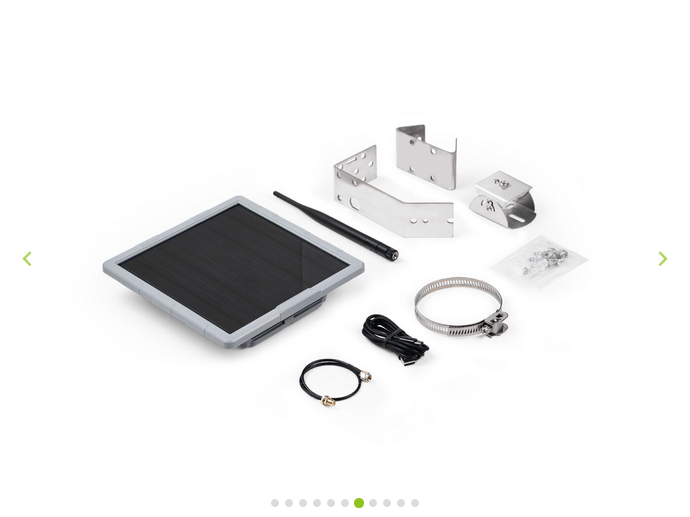
This device is:
- Designed for outdoor, solar-powered operation
- Originally intended for Meshtastic
- Uses low-power LoRa hardware
- Enclosed in a weather-resistant housing
While it ships with Meshtastic firmware, it can be modified or re-flashed to run Meshcore, making it a potential turnkey solution for repeater hosting.
🔧 Note: This device still requires:
- Correct frequency selection (915 MHz)
- External antenna considerations
- Firmware modification for Meshcore use
This option may appeal to users who want a more integrated solution with less DIY work.
Aliexpress alternative link here.
DIY Solar-Powered Repeater (Maker Option)
For builders and tinkerers, a DIY repeater offers flexibility and cost control.
Recommended Platform: RAKwireless WisBlock
For this project, we recommend using:
- RAK4630 or RAK4631 WisBlock modules
These are ideal because they:
- Are extremely low power
- Support Bluetooth firmware updates
- Are widely used in outdoor LoRa projects
- Have strong community documentation
Basic DIY Repeater Parts List
Core Components
- RAK4630 or RAK4631 WisBlock module (915 MHz)
- WisBlock base board
- External LoRa antenna (915 MHz)
- External Bluetooth antenna (2.4 GHz)
- Weatherproof enclosure (IP65 or better)
Power Components
- Small solar panel (5–10 W typical)
- Li-ion battery
- Solar charge controller (low-power); often built-in
- Power wiring and connectors (various)
Mounting
- Mast or pole mount
- Brackets or clamps
- UV-resistant cable ties
- Strain relief for antenna cables
Why External Antennas Matter
For repeater nodes, external antennas are strongly recommended:
- LoRa antenna (915 MHz):
Improves range, reliability, and consistency - Bluetooth antenna (2.4 GHz):
Makes configuration and firmware updates much easier without opening the enclosure
Internal antennas work for testing, but external antennas are far better for permanent installs.
Repeater Nodes Are a Community Asset
Hosting a repeater doesn’t mean you “own” the network — it means you’re helping build shared infrastructure.
Repeater hosts typically:
- Provide a location
- Allow equipment installation
- Help with occasional maintenance
- Coordinate with the community
The project supports hosts through planning, guidance, and shared knowledge.
Interested in Hosting or Building?
f you’re interested in:
- Hosting a repeater
- Building a DIY solar node
- Testing potential locations
- Learning more before committing
Visit the Get Involved section or reach out through the Facebook group or website.